1: Install and connect.
Install DittoDub to YouTube Sync, then sign in with your DittoDub account.

DittoDub streams your dubs, subtitles, and translated metadata straight into YouTube Studio. Click sync and publish globally.
Sync dubs directly into Studio
Batch videos across language tracks
No local audio-download workflow
Built for MLA rollout speed
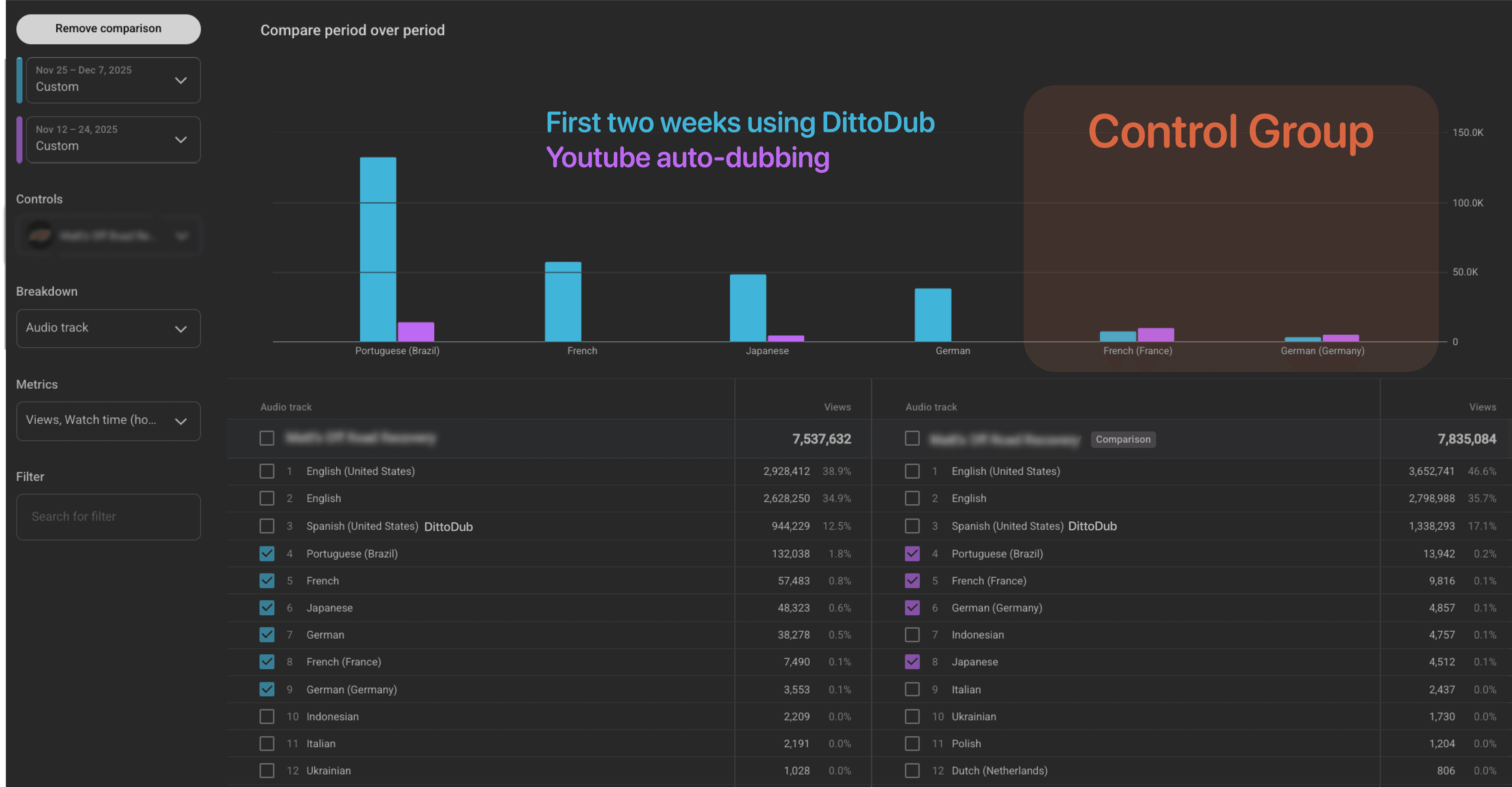
World's best AI dubbing


































































The fastest teams ship dubbed audio, translated metadata, and localized thumbnails as one launch package.
Then $48 after the first month
62% premium for additional minutes
refills monthly • Cancel anytime
Then $194 after the first month
62% premium for additional minutes
refills monthly • Cancel anytime
Then $292 after the first month
62% premium for additional minutes
refills monthly • Cancel anytime
Exporting tracks manually, renaming files, and uploading one language at a time slows release velocity. Every delay weakens recommendation momentum in the first 24 hours.
DittoDub Sync replaces that grind with one connected workflow: generate in DittoDub, open Studio, click sync, publish.
Install DittoDub to YouTube Sync, then sign in with your DittoDub account.
Go to your Content list and select the videos you want to localize with multi-language audio.
The extension detects your active video context and maps it to the correct DittoDub project and language assets.
DittoDub streams tracks directly into YouTube Studio. Keep the Studio tab visible so browser throttling does not interrupt uploads.
• Download dozens of language files to local storage
• Rename and sort assets by hand before upload
• Repeat upload steps per language and per video
• Miss first-day momentum while ops catches up
• Pull assets directly from DittoDub cloud projects
• Map tracks to videos with active Studio context
• Batch language sync from one operating surface
• Publish localization while the release window is hot
DittoDub Sync is designed for end-to-end rollout quality, not just file transfer. Pair it with your dubbing stack for faster, cleaner localization releases.
Direct cloud-to-Studio transfer for audio tracks
Synced subtitles and translated metadata
Bulk handling for multiple videos and languages
Active video detection and project matching
No local download or folder wrangling required
Need localized image hooks too? Add YouTube Thumbnail Translation to align CTR with your new audio tracks.
Push per-language dubs for YouTube Multi-Language Audio without manual file staging.
Sync language-matched subtitle files so accessibility and comprehension launch together.
Bring translated titles and descriptions into your publish workflow for discoverability by market.
YouTube's MLA expansion made global distribution accessible at scale. The winners are creators who ship high-quality language packs on time and keep one canonical URL learning across markets.
• YouTube reported creators with multi-language audio seeing more than 25% of watch time from non-primary languages.
• YouTube highlighted channels like Jamie Oliver that saw major upside after enabling dubs across markets.
• One canonical video URL keeps comments, watch time, and recommendation velocity consolidated.
• Fast sync removes ops bottlenecks, so you can publish dubs on schedule instead of days later.
Use consistent language naming between DittoDub and YouTube Studio.
Review first 60 seconds of each language after upload to verify pacing and clarity.
Publish localized titles, descriptions, and subtitles with each track.
Pair with YouTube Thumbnail Translation for a full localized click-through funnel.